> ## Documentation Index
> Fetch the complete documentation index at: https://s2.dev/docs/llms.txt
> Use this file to discover all available pages before exploring further.
# Access Tokens
> Access tokens let callers use S2 with only the permissions and lifetime they need.
Access tokens are a first-class resource in S2. Like basins and streams, there is no limit on how many you may issue. They can be **scoped** to a specific resource name or prefix, and the operations allowed on those resources.
Access tokens are **revocable** and support an **optional expiry**. Permanent tokens work well for services; time-limited ones suit ephemeral usage like end-user sessions.
There are 2 ways to list, issue, and revoke access tokens:
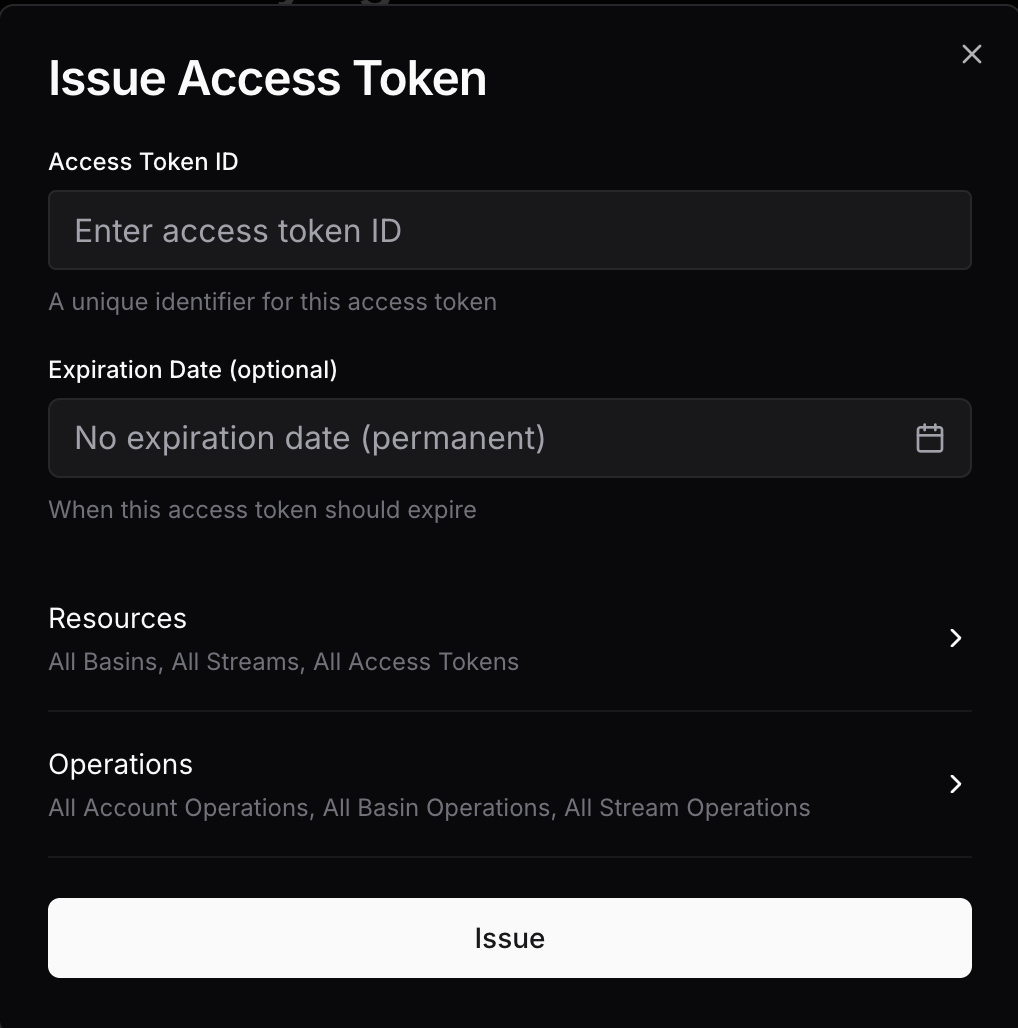 Of course to use the API you will need an access token in the first place!
[`GET /access-tokens`](/api/access-tokens/list)
Of course to use the API you will need an access token in the first place!
[`GET /access-tokens`](/api/access-tokens/list)
[`POST /access-tokens`](/api/access-tokens/issue)
[`DELETE /access-tokens/{id}`](/api/access-tokens/revoke)
## Properties
### Identifier
Access token IDs must be unique to the account and may be up to 96 bytes in length.
List requests allow prefix filtering, which is handy for namespacing with a delimiter like `/`. For example, you can name them as `user/{user}` and `service/{service}` to easily filter for access tokens for users vs services.
### Expiration
An expiry time at which the access token becomes immediately invalid.
This is specified as an RFC 3339 timestamp with the API.
Expiry time of the **requestor**'s access token will be the **default and maximum possible** expiry time when issuing a new token.
Dashboard access does not have an expiry, so permanent access tokens can be issued from there. However, a limited-expiry access token can be used to only issue new access tokens bounded by its own expiry.
### Scope
#### Resources
Access to the following resources can be scoped:
* Basins
* Streams
* Access tokens
To specify the set of resources for each of these, you can choose either of:
**Grant access to all resources with a common prefix:**
```json theme={null}
{ "prefix": "logs/" }
```
Empty prefix matches all resources (allow all).
**Grant access to one specific resource:**
```json theme={null}
{ "exact": "my-stream" }
```
Empty exact match will not match any resources (deny all).
When configuring access to streams with a prefix, you can also enable *auto-prefixing*.
This acts as a transparent logical namespace within a basin:
* Stream name arguments provided in requests will be automatically prefixed.
* The prefix will be stripped from a response containing a stream name, such as when listing streams.
```mermaid theme={null}
graph LR
subgraph User View
U1["User operates on stream: 'logs'"]
U2["User sees: 'logs'"]
end
subgraph S2 View
S1["auto_prefix_streams = true"]
S2["Prefix is set: { prefix: 'user1/' }"]
S3["S2 sees: 'user1/logs'"]
end
S1 --> S2 --> S3
U1 --> S3
S3 --> U2
```
By default, access tokens are least permissive.
```mermaid theme={null}
graph TD
A["If not specified"]
A --> B["basins: No access"]
A --> C["streams: No access"]
A --> D["access_tokens: No access"]
A --> E["op_groups: All false"]
A --> F["ops: Empty"]
A --> G["auto_prefix_streams: false"]
```
#### Operations
There are two complementary ways to authorize operations:
Operation groups provide a high-level way to grant read/write access.
```json theme={null}
{
"op_groups": {
"account": { "read": false, "write": false },
"basin": { "read": true, "write": false },
"stream": { "read": true, "write": false }
}
}
```
Group-level permissions will also apply to any new operations added to the group.
For more precise control, explicitly specify the allowed operations:
```json theme={null}
{
"ops": [
"read",
"check-tail"
]
}
```
Both groups and individual operations may be specified together — the effective permissions are a union.