> ## Documentation Index
> Fetch the complete documentation index at: https://s2.dev/docs/llms.txt
> Use this file to discover all available pages before exploring further.
# Studio
> S2 Studio is a browser-based data plane explorer built into the dashboard for reading and writing stream records interactively.
## Overview
Studio lets you:
* **Read** records from any stream, starting from a tail offset, sequence number, or timestamp
* **Stream** records live as they arrive
* **Append** records individually, line-by-line, or as a JSON array
* **Trim** records up to a sequence number to reclaim storage
* **Fence** a stream to enforce exclusive write access
***
## Opening Studio
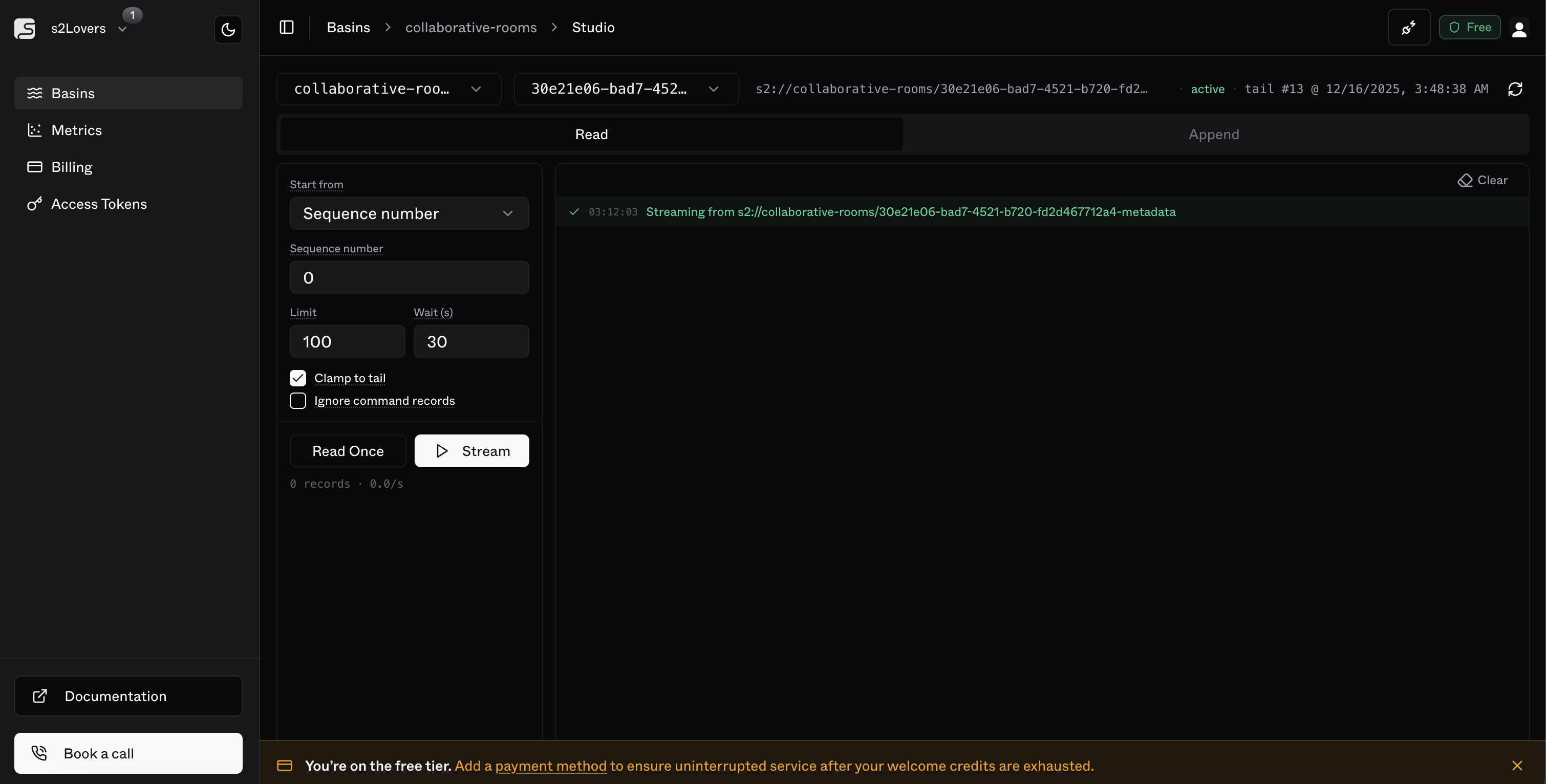
Navigate to any basin in the dashboard, then click **Studio** in the stream list header. You can also switch basins and streams directly from within Studio using the selectors at the top.
 ***
## Connection
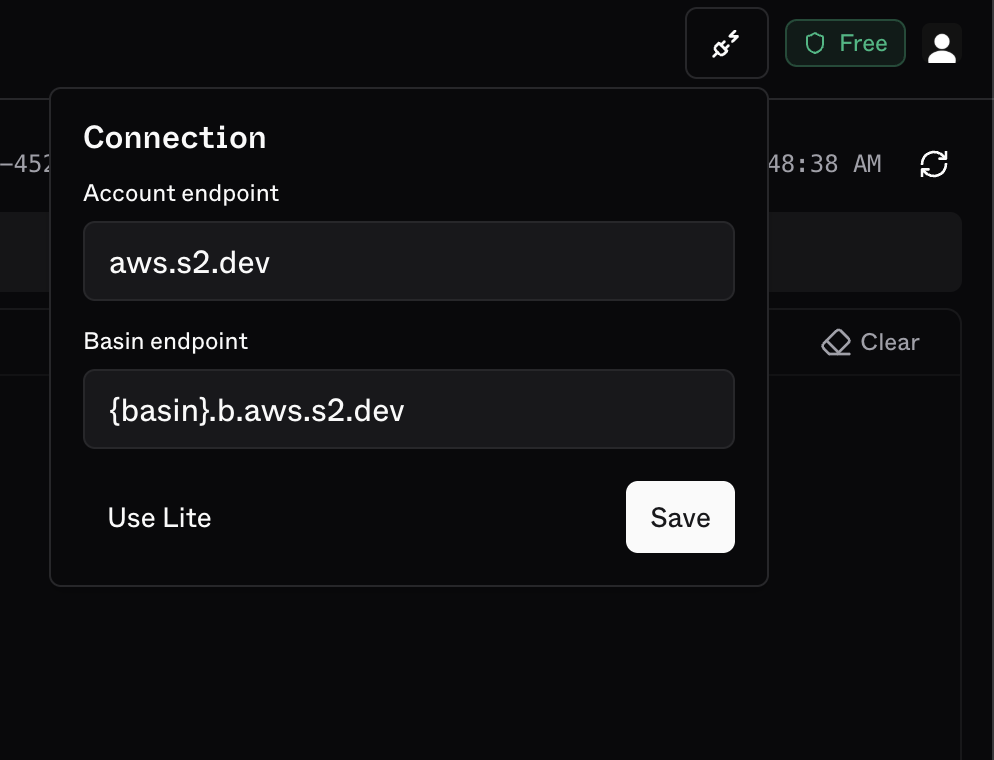
By default, Studio connects to S2. You can override this to point at [s2-lite](/s2-lite) for local development.
Click the **connection badge** in the top-right header to open the connection settings.
***
## Connection
By default, Studio connects to S2. You can override this to point at [s2-lite](/s2-lite) for local development.
Click the **connection badge** in the top-right header to open the connection settings.
 ### Connecting to s2-lite
Run s2-lite with a self-signed certificate so the browser can connect over HTTPS:
```bash theme={null}
s2 lite --local-root /tmp/s2-data --tls-self
```
Lite listens on `https://localhost` (port 443) by default.
In the connection popover, click **Use Lite**. This pre-fills both endpoints with `https://localhost`.
### Connecting to s2-lite
Run s2-lite with a self-signed certificate so the browser can connect over HTTPS:
```bash theme={null}
s2 lite --local-root /tmp/s2-data --tls-self
```
Lite listens on `https://localhost` (port 443) by default.
In the connection popover, click **Use Lite**. This pre-fills both endpoints with `https://localhost`.
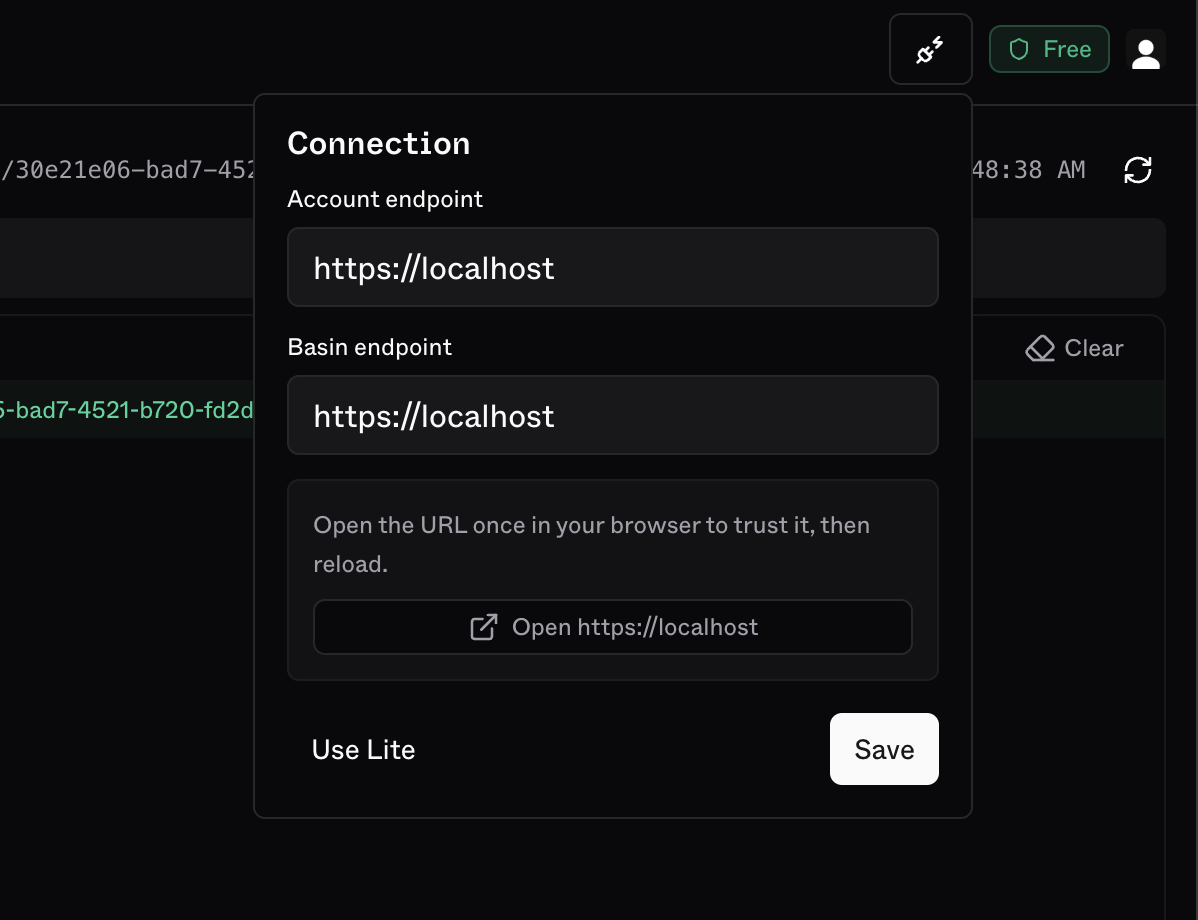 Since Lite uses a self-signed certificate, you need to trust it in your browser once.
The popover will show a prompt — click **Open [https://localhost](https://localhost)** to open it in a new tab, then accept the browser security warning.
After accepting the cert, come back to Studio and click **Save** to apply the connection. The page will reload and connect to your local Lite instance.
s2-lite sends permissive CORS headers by default, allowing the dashboard to connect from any origin. Use `--no-cors` to disable this in stricter deployments.
***
## Read
The **Read** tab lets you fetch records from the selected stream.
Since Lite uses a self-signed certificate, you need to trust it in your browser once.
The popover will show a prompt — click **Open [https://localhost](https://localhost)** to open it in a new tab, then accept the browser security warning.
After accepting the cert, come back to Studio and click **Save** to apply the connection. The page will reload and connect to your local Lite instance.
s2-lite sends permissive CORS headers by default, allowing the dashboard to connect from any origin. Use `--no-cors` to disable this in stricter deployments.
***
## Read
The **Read** tab lets you fetch records from the selected stream.
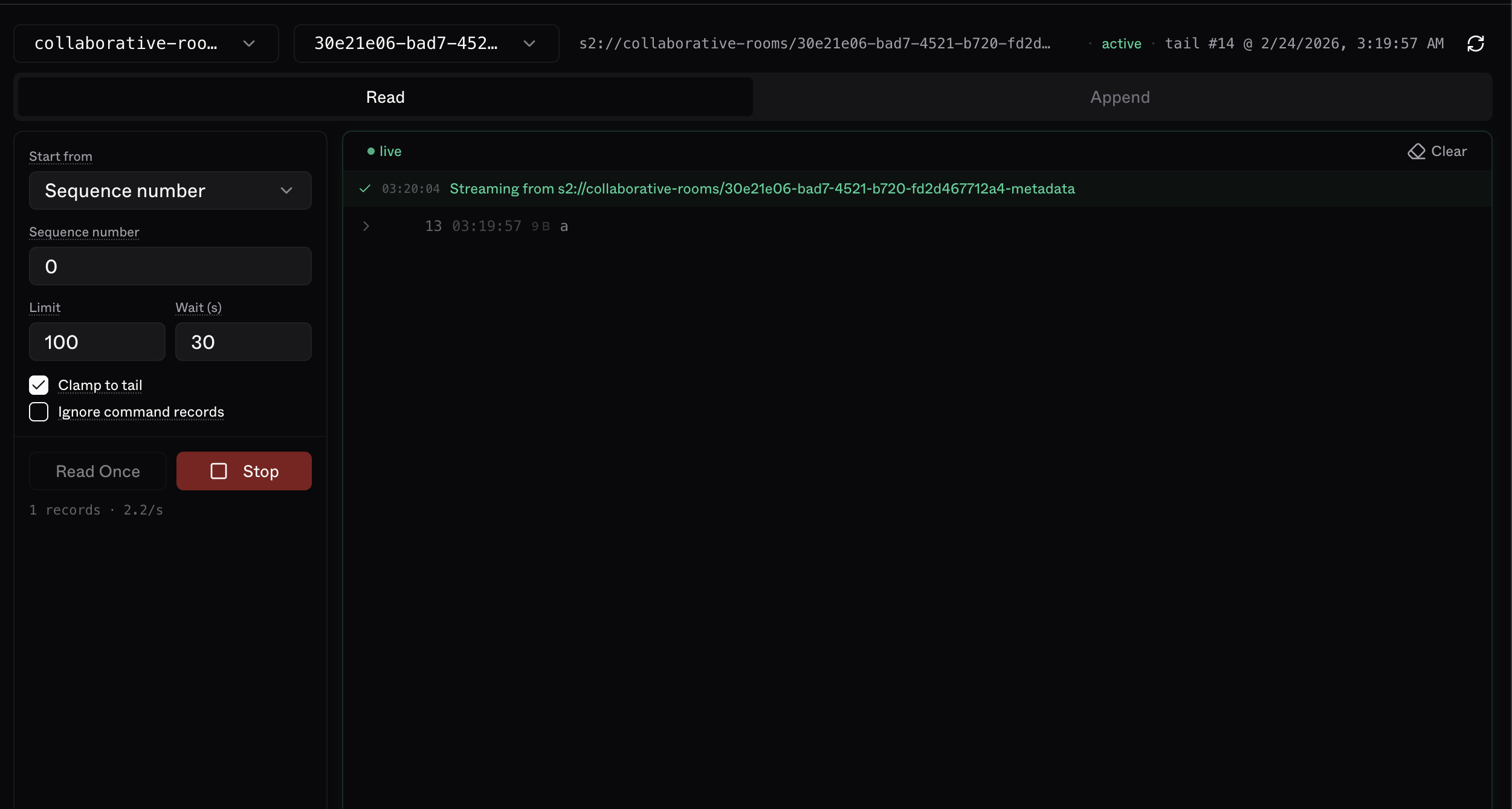 | Field | Description |
| -------------------------- | ------------------------------------------------------------------------------------------------------- |
| **Start from** | How to anchor the read position: tail offset, sequence number, or timestamp |
| **Tail offset** | Number of records back from the stream tail (e.g. `10` = last 10 records) |
| **Sequence number** | Absolute sequence number of the first record to read |
| **Timestamp** | Start from the first record at or after this time |
| **Limit** | Maximum records to return per batch (up to 1000) |
| **Wait (s)** | Seconds to hold a streaming connection open at the tail before stopping. `0` stops immediately at tail. |
| **Clamp to tail** | If the start position is beyond the tail, clamp to tail instead of erroring |
| **Ignore command records** | Filter out fence and trim command records i.e. only data records are returned |
### Read Once vs Stream
* **Read Once** — fetches a single batch with the current settings
* **Stream** — opens a continuous session that delivers records as they arrive
***
## Append
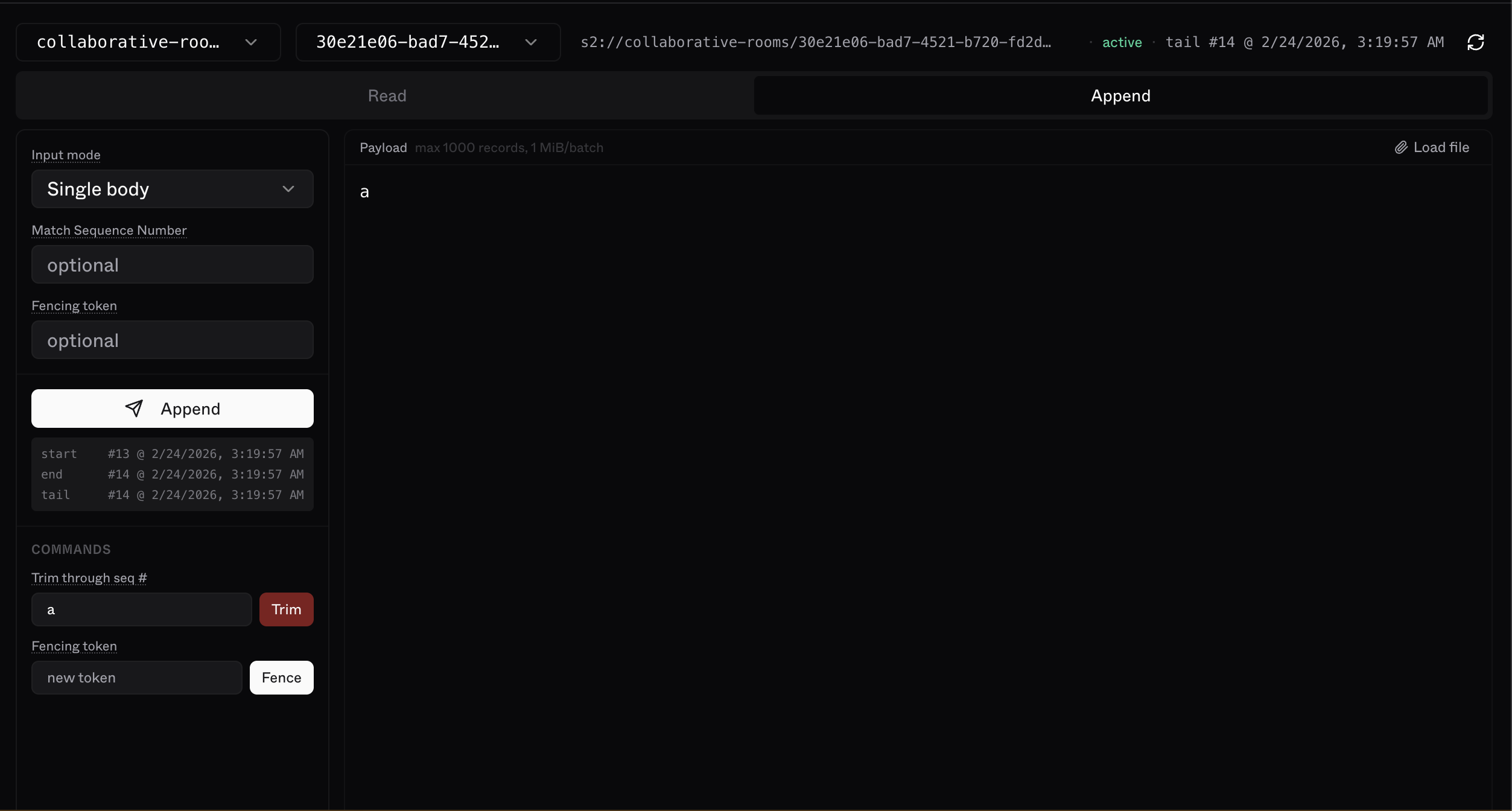
The **Append** tab lets you write records to the selected stream.
| Field | Description |
| -------------------------- | ------------------------------------------------------------------------------------------------------- |
| **Start from** | How to anchor the read position: tail offset, sequence number, or timestamp |
| **Tail offset** | Number of records back from the stream tail (e.g. `10` = last 10 records) |
| **Sequence number** | Absolute sequence number of the first record to read |
| **Timestamp** | Start from the first record at or after this time |
| **Limit** | Maximum records to return per batch (up to 1000) |
| **Wait (s)** | Seconds to hold a streaming connection open at the tail before stopping. `0` stops immediately at tail. |
| **Clamp to tail** | If the start position is beyond the tail, clamp to tail instead of erroring |
| **Ignore command records** | Filter out fence and trim command records i.e. only data records are returned |
### Read Once vs Stream
* **Read Once** — fetches a single batch with the current settings
* **Stream** — opens a continuous session that delivers records as they arrive
***
## Append
The **Append** tab lets you write records to the selected stream.
 ### Input modes
| Mode | Behavior |
| ---------------- | ----------------------------------------------------------- |
| **Single body** | The entire payload is sent as one record |
| **One per line** | Each non-empty line becomes a separate record |
| **JSON array** | Parse payload as a JSON array of `{body, headers?}` objects |
You can also **load a file** directly into the editor — the input mode is auto-detected from the file extension (`.json` → JSON array, `.jsonl`/`.ndjson` → one per line, `.txt` → single body).
### Optional fields
| Field | Description |
| ------------------------- | ---------------------------------------------------------------------------------------- |
| **Match Sequence Number** | Only append if the stream tail matches this sequence number. |
| **Fencing token** | Required if the stream has a fencing token set. Must match exactly (max 36 bytes UTF-8). |
### Commands
| Command | Description |
| ---------------------- | --------------------------------------------------------------------------------------------------------------------- |
| **Trim through seq #** | Discard all records up to and including this sequence number. |
| **Fence** | Set a new fencing token (max 36 bytes). Once set, all appends must supply this token to enforce single-writer access. |
### Input modes
| Mode | Behavior |
| ---------------- | ----------------------------------------------------------- |
| **Single body** | The entire payload is sent as one record |
| **One per line** | Each non-empty line becomes a separate record |
| **JSON array** | Parse payload as a JSON array of `{body, headers?}` objects |
You can also **load a file** directly into the editor — the input mode is auto-detected from the file extension (`.json` → JSON array, `.jsonl`/`.ndjson` → one per line, `.txt` → single body).
### Optional fields
| Field | Description |
| ------------------------- | ---------------------------------------------------------------------------------------- |
| **Match Sequence Number** | Only append if the stream tail matches this sequence number. |
| **Fencing token** | Required if the stream has a fencing token set. Must match exactly (max 36 bytes UTF-8). |
### Commands
| Command | Description |
| ---------------------- | --------------------------------------------------------------------------------------------------------------------- |
| **Trim through seq #** | Discard all records up to and including this sequence number. |
| **Fence** | Set a new fencing token (max 36 bytes). Once set, all appends must supply this token to enforce single-writer access. |